
Modify
Upstream TLS fingerprints (browser impersonation)
Pro feature. Browser fingerprints need Akev Pro or its 14-day trial. Without a licence, TLS fingerprint rules and settings stay saved, but don't apply.
Anti-bot services — Cloudflare, Datadome, Akamai, PerimeterX… — don't only look at headers.
They fingerprint the TLS handshake (the ClientHello: cipher suites, extensions and their
order, supported groups, signature algorithms…, summarised as JA3/JA4) and the HTTP/2
connection preface (SETTINGS, window sizes, pseudo-header order), and compare them with the
browser the User-Agent claims to be.
Through a debugging proxy the server sees the proxy's TLS stack, not the browser's. A Chrome
User-Agent arriving with a Rust TLS fingerprint looks like a bot, so intercepted browsing gets
captchas, 403s or endless challenge loops (HTTP Toolkit issues #311, #684, #856).
Akev can make its own upstream connections present a real browser's fingerprint instead.
Profiles
| Profile | Imitates | JA4 (with h2 offered) |
HTTP/2 (Akamai) |
|---|---|---|---|
| Native | Akev's own TLS stack (rustls) | rustls' | 2:0;4:2097152|1073676289|0|m,s,a,p |
| Chrome | Chrome 133+ desktop | t13d1516h2_8daaf6152771_d8a2da3f94cd |
1:65536;2:0;4:6291456;6:262144|15663105|0|m,a,s,p |
| Edge | Edge 133+ (Chromium) | same as Chrome | same as Chrome |
| Firefox | Firefox 135+ desktop | t13d1717h2_5b57614c22b0_3cbfd9057e0d |
1:65536;2:0;4:131072;5:16384|12517377|0|m,p,a,s |
| Safari | Safari 18 on macOS | t13d2014h2_a09f3c656075_14788d8d241b |
2:0;3:100;4:2097152;9:1|10420225|0|m,s,a,p |
| Mirror client | the intercepted client's own browser family | — | — |
What is reproduced, per browser:
- TLS ClientHello: cipher suites and their order (incl. TLS 1.3 order and Safari's legacy
3DES suites), extensions and their exact order — or, for Chrome/Edge, Chrome's random
per-connection extension permutation —, GREASE values (Chrome, Edge, Safari) in the browser's
positions, supported groups incl. the post-quantum
X25519MLKEM768hybrid (Chrome, Edge, Firefox) and the number of key shares, signature algorithms (Safari's duplicate included), ALPN, ALPS (application_settings, new codepoint) for Chrome/Edge, certificate compression (Brotli for Chrome; zlib, Brotli and zstd for Firefox; zlib for Safari), ECH GREASE, OCSP stapling and SCT requests, Firefox's delegated credentials and record size limit, session ticket support (not for Safari) and padding. The deterministic JA3s (Firefox6f7889b9fb1a62a9577e685c1fcfa919, Safari773906b0efdefa24a7f2b8eb6985bf37) equal the published values of the real browsers; Chrome's JA3 changes on every connection, exactly like real Chrome's. - HTTP/2: SETTINGS values and order, the connection WINDOW_UPDATE, the HEADERS frame priority (Chrome: exclusive, weight 256; Firefox: weight 42) and the pseudo-header order.
- Requests that must stay on HTTP/1.1 (WebSocket upgrades) offer only
http/1.1— and therefore no ALPS — just like the browsers do.
What is not changed: request headers (User-Agent, sec-ch-ua, header order…) are forwarded
as the client sent them — with Mirror client they already belong to the browser; for other
clients, add the headers you need with a Rewrite rule. TLS session resumption (PSK) isn't
imitated (every connection does a full handshake), nor are HTTP/3/QUIC fingerprints. TLS to an
HTTPS upstream proxy always uses the native stack — only the origin server sees the
fingerprint.
Choosing a profile
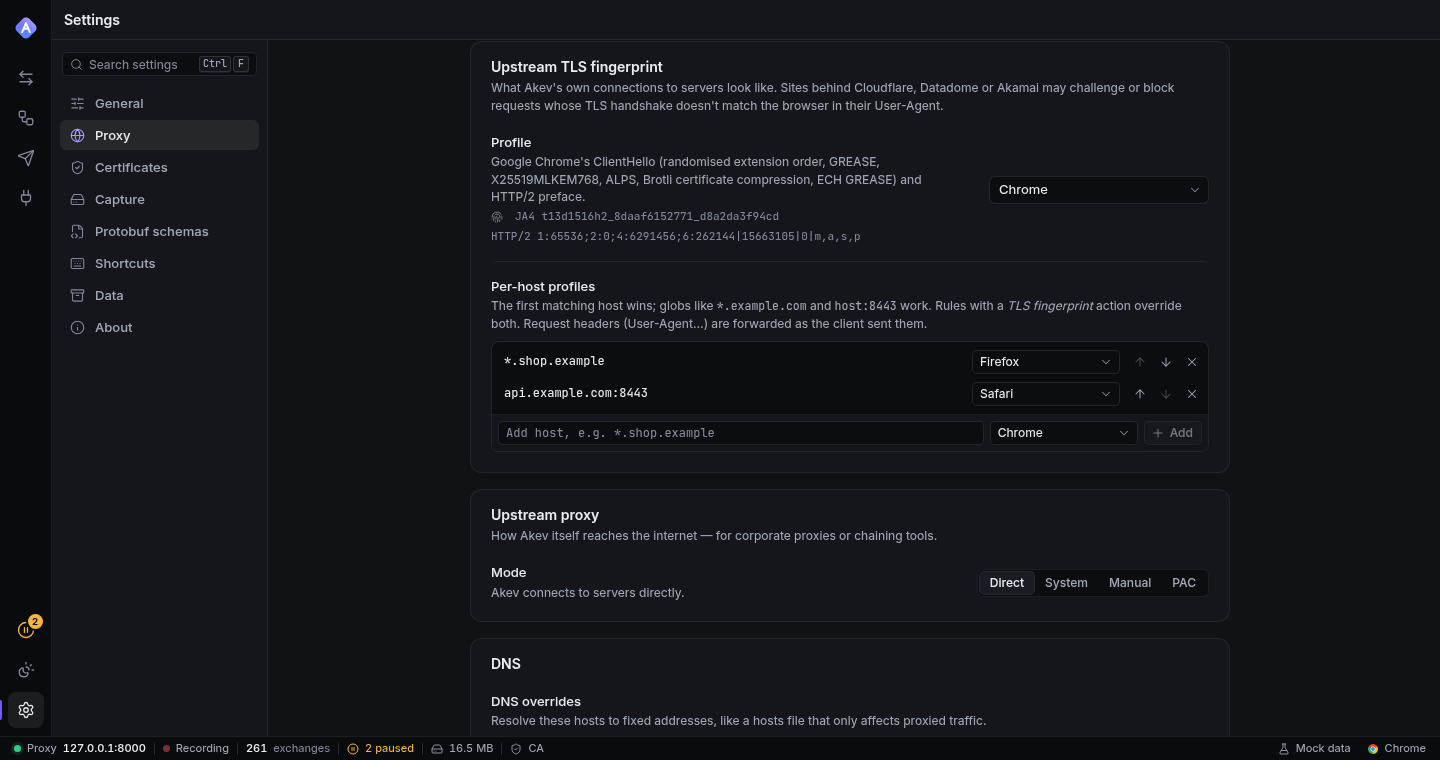
Settings → Proxy → Upstream TLS fingerprint:
- Profile — used for every upstream HTTPS/WSS connection.
- Per-host profiles — host globs (
*.shop.example,api.example.com:8443) with their own profile; the first match wins (reorder them with the arrow buttons).
Rules — the TLS fingerprint action (template Impersonate a browser) sets the profile for matching requests, overriding the settings. It's a modifier: later rules still run, and the last matching TLS fingerprint rule wins.
Precedence for each request: rule → first matching per-host profile → profile.
Mirror client picks the intercepted client's browser family: from the JA4 of the client's
own ClientHello (Chromium, Firefox and Safari each have a stable cipher-suite hash), refined by
its User-Agent (Edge uses Chromium's TLS stack), or from the User-Agent alone for plain-HTTP
clients. Every iOS browser counts as Safari (they all use Apple's TLS stack). Clients that
aren't a recognised browser — curl, SDKs, scripts — keep the native stack. This is usually the
best default when you intercept browsers.
Connections presenting different fingerprints are never shared, and changing the profile applies to new connections immediately (no restart).
Checking what the server saw
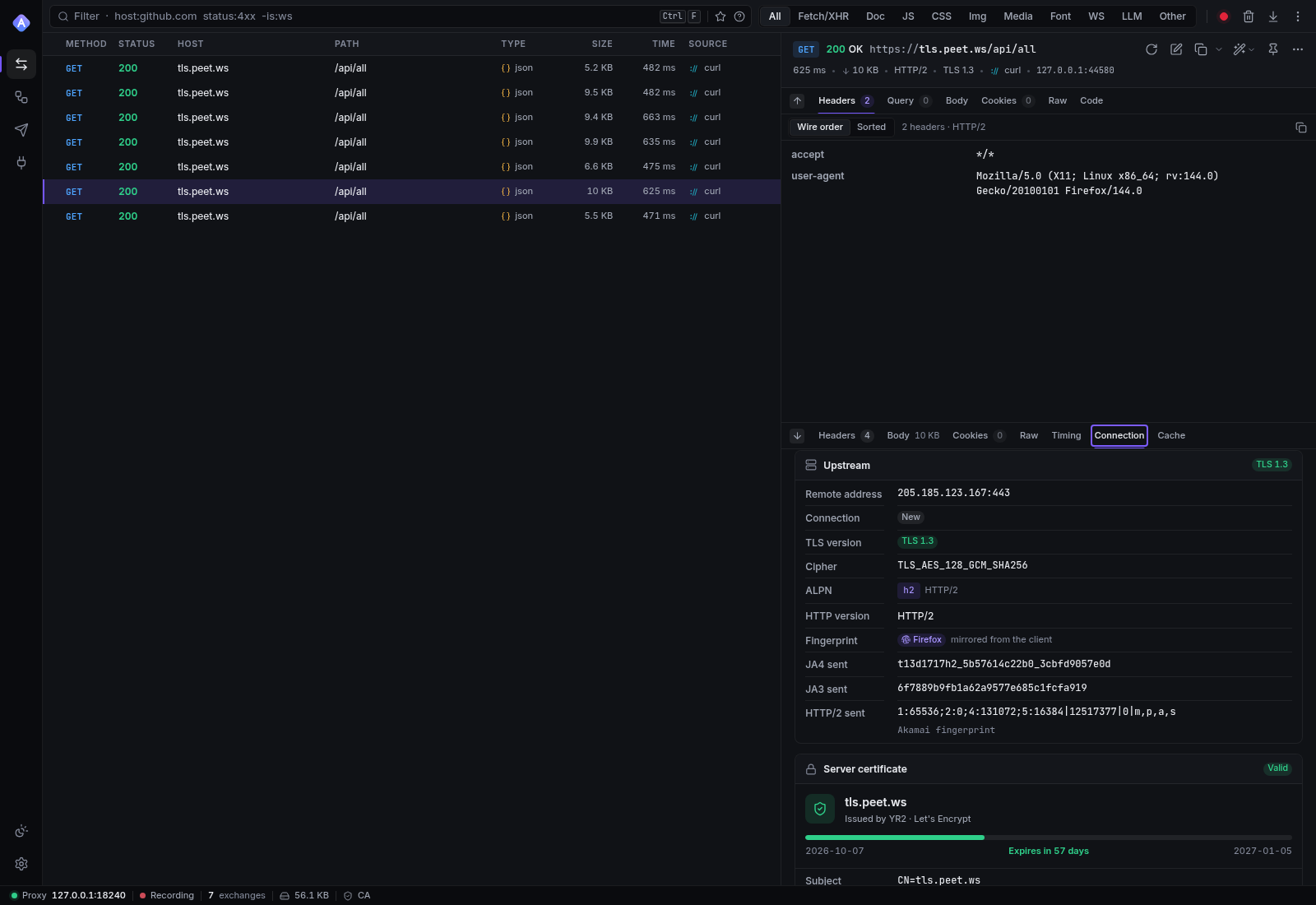
Open an HTTPS exchange → Connection tab → Upstream:
- Fingerprint — the profile used (mirrored from the client, impersonated, or Akev's own TLS stack), with a warning when a requested browser profile couldn't be used.
- JA4 sent, JA3 sent (the copy button copies the full JA3 string) and HTTP/2 sent
(Akamai format) — computed from the bytes Akev actually wrote, so they can be compared with
what fingerprinting services report (e.g.
https://tls.peet.ws/api/all).
The same data is in the API (ExchangeDetail.upstream.fingerprint), in HAR exports
(_akev extension) and in saved sessions.
Checked against a public fingerprinting service: requests through an impersonation build to
https://tls.peet.ws/api/all were seen with exactly the JA4, JA3 and Akamai HTTP/2 fingerprints
listed above (Firefox JA3 6f7889b9fb1a62a9577e685c1fcfa919, Safari
773906b0efdefa24a7f2b8eb6985bf37), and with the same values Akev reported for each exchange.
Builds
Browser profiles use BoringSSL — Chrome's own TLS library — through the boring2 /
tokio-boring2 bindings, whose patched BoringSSL can also reproduce Firefox and Safari (the
approach of curl-impersonate and the wreq crate). Building BoringSSL needs cmake, a
C/C++ compiler and libclang, so the backend is an optional cargo feature, off by
default: regular builds stay pure Rust.
make release-impersonate     # target/release/akev with the backend (builds the UI first)
make test-impersonate        # the Rust test suite with the backend
# or directly:
cargo build --release -p akev-cli --features impersonate
cargo test --features akev-cli/impersonate,akev-api/impersonate,akev-proxy/impersonateThe desktop app has the same pass-through feature (akev-desktop/impersonate).
Prerequisites: Debian/Ubuntu apt-get install cmake clang libclang-dev; Fedora dnf install cmake clang clang-devel; macOS Xcode command-line tools + brew install cmake; Windows the MSVC
build tools, LLVM (libclang) and NASM, as documented by the boring crates. Without root
access, unpack prebuilt CMake and LLVM releases anywhere and point the build at them:
export PATH=$HOME/.local/akev-toolchain/cmake-<version>-linux-x86_64/bin:$PATH
export LIBCLANG_PATH=$HOME/.local/akev-toolchain/LLVM-<version>-Linux-X64/lib
export BINDGEN_EXTRA_CLANG_ARGS="-isystem $LIBCLANG_PATH/clang/<major>/include"(make release-impersonate sources ~/.local/akev-toolchain/env.sh when it exists.)
GET /api/tls-profiles reports whether the running build has the backend. In builds without
it the settings and rule editor say requires an impersonation build, and requests asking for
a browser profile use the native stack — their fingerprint in the Connection tab says so.
Limits
- The profiles imitate the browser versions in the table (current as of this Akev release).
Browsers change their fingerprints occasionally (new extensions, new post-quantum groups);
the data lives in
crates/akev-proxy/src/upstream/fingerprint/profiles.rs, and the tests recompute every documented JA4 from it. - Fingerprinting also looks beyond TLS and HTTP/2 framing — header order and values, JavaScript challenges, IP reputation. Impersonation removes the proxy's own signature; it doesn't make a script look like a person.
- Verified on Linux (x86-64). macOS and Windows builds use the same crates but weren't built in this release's test environment.