
Inspect
Protobuf & gRPC schemas
Pro feature. Decoding protobuf and gRPC without a schema is free. Importing schemas, so bodies show real field names, needs Akev Pro or its 14-day trial. Without a licence, imported schemas and URL mappings stay stored, and bodies show the schemaless decode.
Akev decodes protobuf, gRPC and gRPC-Web bodies even without a schema: the Decoded view
shows field numbers and guesses at the values ({"1": "Teapot", "3": {"1": "EUR"}}). Import
your .proto files and the same bodies show real field names, enum names and nested
messages instead — no restart, no build step, no protoc needed.
Import schemas
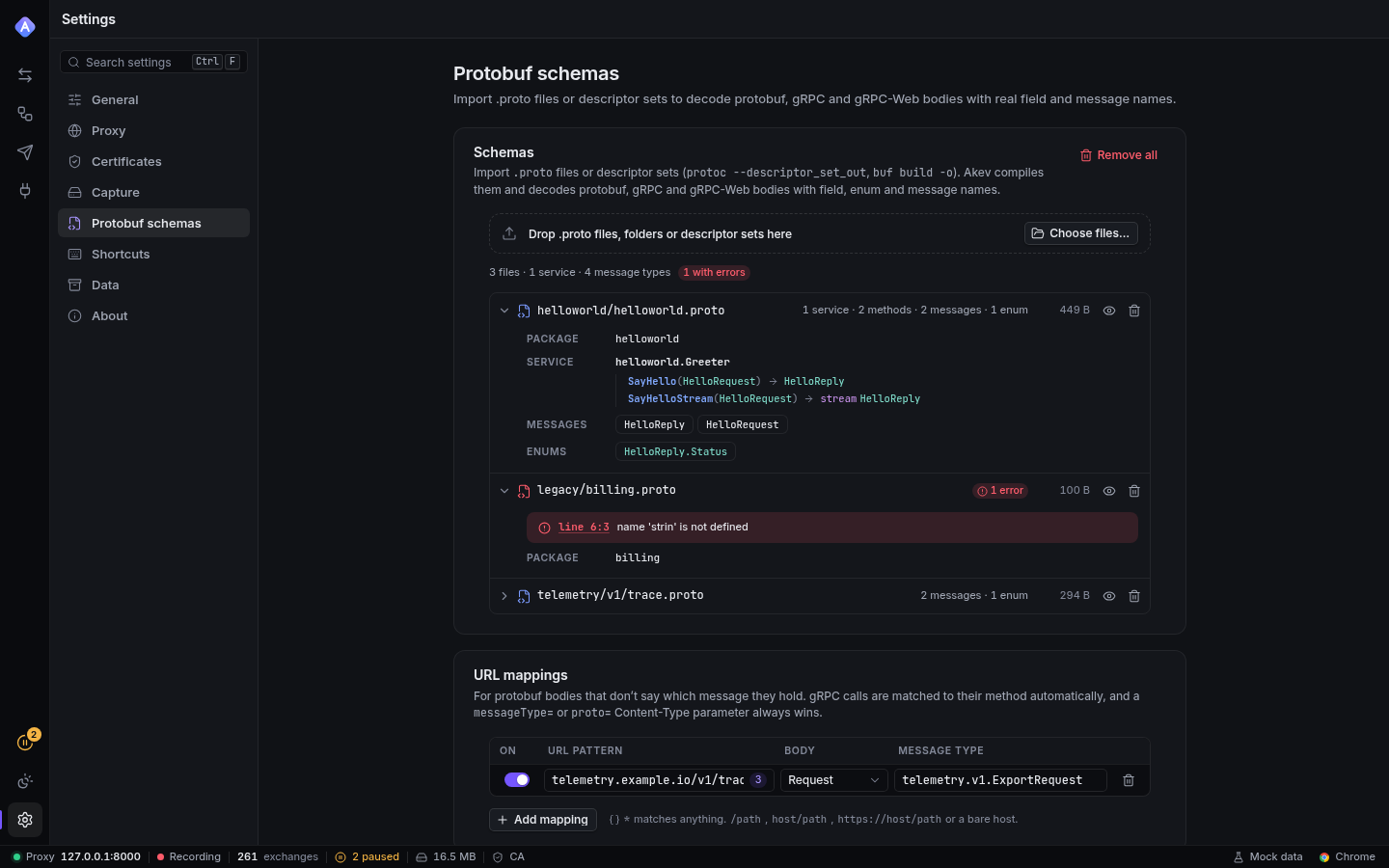
Open Settings → Protobuf schemas and drop files onto the card (or Choose files…):
.protofiles — compiled inside Akev (by protox, a protobuf compiler written in Rust). Drop a whole folder to keep its layout; imports such asimport "shop/common/money.proto";resolve by path. Files dropped without their folders are matched by file name, so a flat folder of downloads works too. The well-known types (google/protobuf/timestamp.proto,any,struct,wrappers,duration, …) are built in.- Descriptor sets (
.desc,.pb,.binpb,.protoset) — whatprotoc --include_imports --descriptor_set_out=api.desc …orbuf build -o api.binpbwrite. Use them when you don't have the sources, or when the sources need custom import paths. Their files can also be imported by.protofiles you upload.
Every file is listed with what it defines: services with their methods
(GetItem(GetItemRequest) → Item, streaming marked), messages and enums. A file that doesn't
compile shows its errors with line and column (click one to open the source) and the other
files keep working. Upload a fixed version under the same name to replace it.
Schemas are stored in the data directory (protos/) and survive restarts (except for
--ephemeral sessions, which keep them in memory only).
How a body gets its message type
For each body, the first of these that applies wins:
- Content-Type parameter —
application/x-protobuf; messageType="shop.v1.Item"(alsoproto=ormessage=).encoding=delimited(as used by Prometheus) means a sequence of length-prefixed messages; each one is decoded. - gRPC / gRPC-Web method — the request path
/shop.v1.Catalog/GetItemnames the service and method: requests decode as the method's input type, responses as its output type. Every message of a streaming call is decoded. Paths with a prefix (/api/shop.v1.Catalog/GetItem, common for gRPC-Web) work too. - URL mappings — for plain protobuf APIs that don't say what they send. In the URL mappings card, map a URL pattern to a message type, for request bodies, response bodies or both. The badge in each row counts how many recently captured exchanges match.
| Pattern | Matches |
|---|---|
/v1/items/* |
the path (with or without the query string) |
api.example.com/v1/items/* |
host (:port when not the default) and path |
https://api.example.com/v1/* |
the whole URL |
*.example.com |
every URL of matching hosts |
* matches any characters (/ included); matching ignores case. Mappings to a type the
imported schemas don't define are kept but do nothing until it is imported. A mapped body
served as application/octet-stream becomes a protobuf body when it decodes.
Reading typed bodies
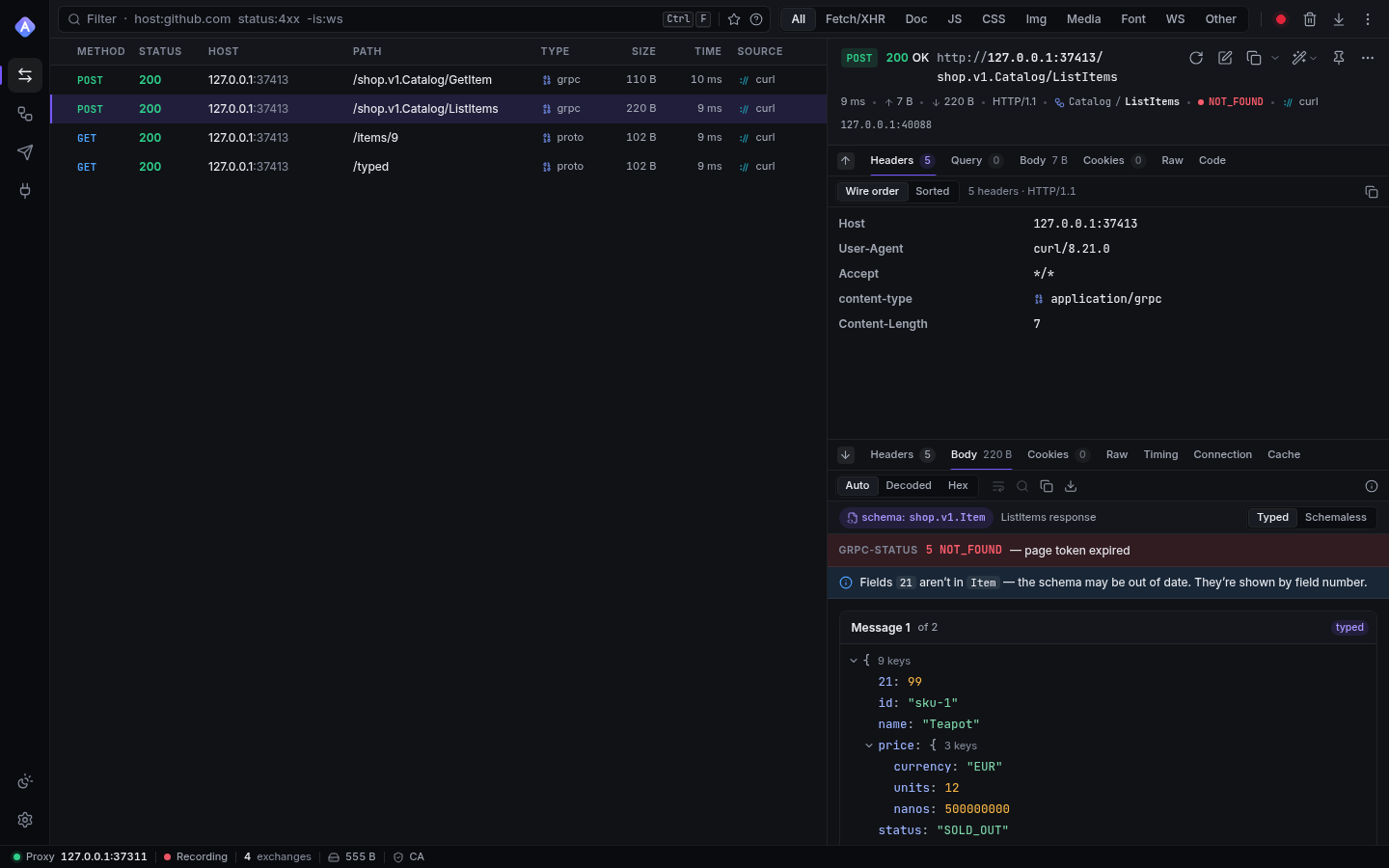
The Decoded view shows a schema: shop.v1.Item badge (hover for why that type was
chosen) and a Typed / Schemaless toggle:
- Typed — the proto3 JSON mapping with the field names from the
.proto: enums by name,bytesas base64, maps sorted by key, 64-bit integers exact, and the well-known types in their JSON form ("2026-11-09T08:00:00Z"for aTimestamp,"90.5s"for aDuration,{"@type": …}for anAny). - Schemaless — the field-number view, exactly as without a schema.
If the bytes don't fit the schema (wrong wire types, invalid UTF-8 in a string, …) Akev
says why and falls back to the schemaless decode — usually a sign the mapping or the schema
version is wrong. Fields on the wire that the schema doesn't define are kept under their
numbers and called out: the schema is probably older than the server.
For gRPC calls, the detail header shows the service and method (Catalog / GetItem) and the
call's grpc-status from the trailers (green OK, red NOT_FOUND, …); the body view lists
each message and the trailers.
API & agents
Everything above is available over the API (/api/protos, /api/protos/mappings, see
API.md) and body views carry the typed decode, so MCP agents
reading akev_get_exchange with includeBodies see field names too:
# Upload sources (JSON) or a descriptor set (raw bytes)
curl -H "Authorization: Bearer $TOKEN" -H 'content-type: application/json' \
  -d '{"files":[{"name":"shop/v1/catalog.proto","content":"syntax = \"proto3\"; …"}]}' \
  http://127.0.0.1:45456/api/protos
curl -H "Authorization: Bearer $TOKEN" --data-binary @api.binpb \
  'http://127.0.0.1:45456/api/protos?name=api.binpb'